This browser is not supported. To ensure the best possible user experience, please use one of the following browsers:
Chrome | Firefox | Internet Explorer | Safari | Opera

Support Center

Our frequently asked questions service offers answers to common questions. If you don't find an answer, please contact our customer support and a representative will be able to assist you.

Account Management

How can I confirm that my banking information is correct?

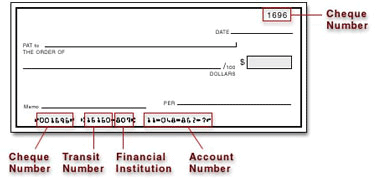
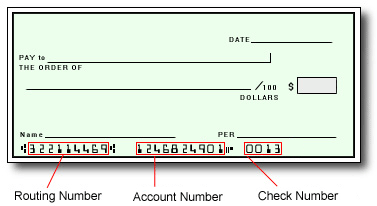
The best way to confirm that you have entered your banking information correctly is to refer to the numbers on the bottom of your check.

In Canada and the United States, your account information would be displayed as shown on the sample checks below:

Canadian Accounts:

American Accounts:

For all other regions, please refer either to your bank statement or contact your financial institution to confirm your banking information.


Customer Support

How do I contact Customer Support?
Please refer to the Support tab at the top of the page for support hours and contact information.
I forgot my Bioclinica Patient Reimbursement Portal password. What should I do?

Please note we do NOT keep a record of your password!

If you have forgotten your password, you may reset it by following these steps:

  1. Click on Forgot Your Password? or Resend Activation Email.
  2. Enter your email address registered with the Pay Portal.
  3. Wait for a password reset email.
  4. Click on the password reset link in the email.
  5. Enter the answers to your security questions (answers are case sensitive).
  6. Enter a new password you have not previously used.
  7. Confirm the new password.
  8. Click on Submit.

Click here if you have forgotten your password


Bioclinica Patient Reimbursement Visa Prepaid Card

Registering your Prepaid Card

Do I need to activate this card?

No, your card is already active when you receive it.  The funds on the card are instantly available and it can be used wherever Visa debit cards are accepted. To gain access to withdraw from an ATM, you will need to register your card at www.myclindebit.com.


What are the benefits in registering my card?

When you receive your card, it will only have a max balance of $1000, with a $1000 daily spend with no ATM access. By registering your card, you will be upgraded to:

  • Max balance of $10,000
  • ATM access
  • Online/mobile access for transaction history and balance
  • Increased daily spend limit of $2500


How do I register my card?

  • Go to www.myclindebit.com
  • Click on Activate Account
  • Enter your 16 digit card number
  • Enter your first and last initial
  • Enter your registration details
Create your PIN for ATM access
Using your Prepaid Card

How can I get money onto the card?

Your card can only be loaded by the clinical trial administrator.

Where can I use the card?

You can use your Prepaid Card to make purchases from any merchant bearing the Visa Acceptance Mark, including online purchases (except for online gambling merchants).

Please note that some merchants such as gas stations or rental car agencies may have a policy to not accept prepaid cards. This is a merchant-specific policy.

How can I obtain my card balance?

If you have not yet registered your card, you can check your card balance by calling the number on the back of the card:

  • Press 1 for card related inquiries
  • Press 2 to obtain your card balance
  • Enter your 16 digit card number and hit  #
  • Enter your first and last initials (ie. J.S. = 57)

Once you have registered your card online, there are four ways you can check your card balance:

  • By logging into www.myclindebit.com and viewing your card balance.
  • Using your smartphone, by accessing your Pay Portal via the mobile site www.myclindebit.com
  • By consulting an ATM.
  • By calling the number listed on the back of your card and selecting the option to obtain your card balance.

How long does it take for my transaction history to update with my card transactions?

Your Pay Portal transaction history will be updated with your card transactions a few moments after the card processor receives the transaction information. Please note that not all merchants may immediately submit their card transactions for processing, so you may not see the transactions in your history right away.


Can I use the card to withdraw cash at an ATM? If so, which symbols should I look for on the ATM?

Only after you have registered your card on www.myclindebit.com, you can use your prepaid card to make cash withdrawals at any ATM bearing the Visa Acceptance Mark. Please refer to your Cardholder Agreement to view your withdrawal limits.


Can I use the card outside of the country?

Yes, your Prepaid Card can be used internationally. If you make a purchase or withdrawal in a currency other than the currency in which your card was issued, the Issuer may assess a foreign currency conversion fee of 3% of the transaction amount.

What is the maximum balance my card can carry?

Your card will have a maximum balance of $1000 when you receive it. If you have registered your card online, the max balance will be increased to $10,000.

What limits is my card subject to?

Your prepaid card is subject to transaction limits as defined in your Cardholder Agreement under Fees and Limits Schedule.

Problems with your Prepaid Card

What should I do if I forget my PIN?

If you forget your PIN after registering your card, you can reset it using the Reset PIN feature found in your online Pay Portal under your Profile.

What should I do if my Prepaid Card is lost or stolen?

If your card is lost or stolen, please immediately call and report it to the number shown here , any time of day and any day of the week. Our agents can then assist you by cancelling the card and issuing a new one for you.

What do I do if I don't recognize the merchant listed on my statement?

Some merchants may bill under a name other than their operating name or bill from a state different from where you made your purchase. If you still have questions about the transaction, please contact the merchant directly.

What is a Prepaid Card dispute?

If you believe that a prepaid card transaction has been posted to your account in error, you may submit a prepaid card dispute within 60 days of the date that appears on the transaction statement or receipt.

What happens after I submit my dispute?

After we confirm your dispute claim, we may need to contact the merchant and their bank regarding the disputed transaction. In some cases, we may contact you again via Mail if we need more information. We process disputes according to billing error procedures that are governed by federal law and outlined in your credit card agreement.

What should I do before I submit a Prepaid Card dispute?

A quick call to the merchant can often answer your questions and easily resolve your credit card dispute. However, if this is not resolved, you may want to submit a dispute.

How do I submit a prepaid card dispute?

Download the dispute form and follow the procedures pertaining to your Prepaid Card type:

Visa USA

Disputes are subject to time limits which vary between 30 and 120 days after the date they appear in your transaction history.

Most transactions must be disputed within 60 days of the date when they appear on your transaction history.

How long will it take to be reimbursed for unauthorized charges?

Approximately 45 – 60 days.
What should I know about using my prepaid card at gas stations, hotels and other merchants?

When you swipe or insert your prepaid card at a gas station pump, the gas station will place a pre-authorized hold of up to $125.00 USD or more on your card prior to you filling up.

The actual amount purchased will be processed on the card at a later time, but the initial hold may last for 8 days before being released, minus the amount of gas that was purchased.

During the time that the hold is in effect, the funds being held will be unavailable for you to use.

When the transaction settles, you will only be charged for the amount of gas purchased.

To avoid pre-authorized holds, we recommend pre-paying inside the gas station so you can specify the exact amount of gas you wish to purchase.

Some other merchants may have similar practices and even longer maximum pre-authorization timeframes:

  • Hotels and cruise lines (up to 30 days)
  • Vehicle rental agencies (up to 60 days)
  • Financial institutions (up to 10 days)

In some cases, the merchant may be able to make an exception and release the pre-authorized hold earlier than the maximum allowed hold time.

Why is a transaction still outstanding?

If you notice a transaction under the status “outstanding purchase”, the merchant has not yet cleared the transaction. Transactions are usually cleared by the merchant shortly after the purchase was made.

However, some merchants such as gas stations, hotels, or cruise lines for example may pre-authorize a larger amount than the initial purchase and keep a hold on the funds for a longer time. These transactions will remain “outstanding purchases” until the merchant releases the funds and clears the transactions.

Can I dispute an outstanding purchase?

Please note that you will not be able to dispute a transaction if the status is still “outstanding purchase”. However, the merchant should be able to release the funds early. In order to have the funds released, please refer to section below.

How to release Pre-Authorized transaction?

If you would like to have the funds released earlier than the usual time frame, please follow the instructions below:
The merchant will need to fax a pre-authorization release letter to Hyperwallet Systems Inc. at +1 604 424-9926.
The letter will need to be sent directly from the merchant and will also need to be on company letterhead. The following information must be included for the authorization to be released:

  • Customer’s Name
  • Customer’s card # (first 6 and last four digits only)
  • Date of authorization
  • Authorization Amount in original currency
  • Authorization Code
  • Merchant ID

If the pending authorization is from a car rental, the merchant will also need to supply a copy of the closed contract (showing that the car has been returned).
If the pending authorization is from a hotel, the merchant will also need to supply a copy of the closed folio (showing check in/check out).

What is mobile wallet tokenization?

Your real card number is used to create a special number called a 'token'. This token is used to check and process your payment. The system uses this token, not your real card number.

A mobile wallet gives you a quick, secure, and easy way to pay. You can use it when shopping in person or online instead of your physical card.


Are mobile wallets safe to use?

Yes. Wallets are safer than physical cards. Using a wallet lowers the risk of fraud because you can use your device's password and eye scanners. Tokenization hides your card number. The store you're paying can't see it.


Which cards are eligible?

USD Prepaid Cards issued by Pathward, N.A. or The Bancorp Bank, N.A.


How do I keep my device and card details secure?

  • Use your device’s additional security options. Create a lock-screen PIN and setup fingerprint or iris recognition if available.
  • Register your own fingerprint on your device. Do not allow anyone to add their fingerprint.
  • Do not leave it where others can see it or take it when you are not watching it.
  • Be careful of messages you did not ask for. They may ask you to share personal, money information or  put software on your phone or computer.
  • If your card is lost or stolen, call our customer support. We can stop using the card and give you a new one.
  • If your device has a 'Find My' service, sign up for it. This will help you find your device if it is lost or stolen. You can lock the device from another location. You can delete any private information on it from another location.


What’s the difference between Samsung Pay & Google Pay?

Google Pay allows you to pay by tapping. This can be used at stores with the right type of payment terminal. Stores may need to update their terminals to accept devices with the special NFC.

Samsung Pay allows you to pay by tapping your phone at payment terminals that accept debit or credit cards.

The tap-to-pay function works on most payment terminals in the world.


How will the payments I make using this service be shown on my card?

What will these payments look like on my card?

Purchases made on a wallet will appear on your Pay Portal history. Like any other transaction you make.


How do I return an item purchased using a mobile wallet?

You'll need the paper from when you bought the item. If the store asks you to swipe your card or use the same way you paid, hold your phone against the payment terminal.


Can I use my mobile wallet to pay in-store internationally?

Yes, you can use your wallet to make payments where accepted. There may be extra fees. You can find more details in the card documentation.


How do you verify that I am the rightful owner of the card?

When you add a new payment method, we will send you a code by text. You will need to enter this code to complete the registration.

*Standard text messaging and/or data rates from your wireless service provider may apply.


How do I learn more about Samsung Pay?

For more information, click here.

How do I learn more about Google Pay?

For more information, click here.

Contact us:

Email Support

Please login to Bioclinica Patient Reimbursement Portal and use the form provided under the Support section to send us your question. If you have issues logging in, please contact us by phone.

Telephone

Live Customer Support Representatives are available:

English: Monday - Friday from 08:00 - 20:00*, Saturday & Sunday from: 08:00 – 17:00*
Spanish: Monday - Sunday from 08:00 - 17:00*
French and Mandarin Chinese: Monday - Friday 08:00 - 17:00* 

* Please note all the hours mentioned above are in Pacific Time. 
  • North America: 1-855-722-0190
  • Worldwide: 1-604-424-9578

Chat

Chat support may be available if offered by your company. Please be sure you’re logged in to take advantage of our live chat feature. If you’re logged in already, look for the chat icon in the bottom-right corner of the page.